Apex Legends on Windows PC

Apex Legends Cheats ESP, Aimbot & PC Hacks

Apex Legends cheats for Windows PC worldwide: player ESP, soft aimbot, loot ESP, radar, no recoil, and a separate skin changer. Read features, check status, then buy with monthly or lifetime plans.

Start with the features list, compare monthly and lifetime plans, then check current status and Windows PC setup before checkout.

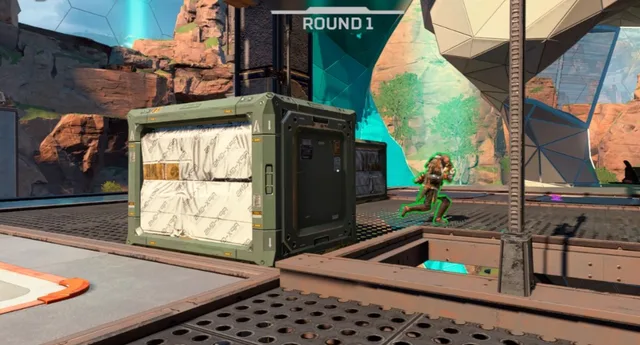
Apex Legends Cheats player ESP glow outline on an enemy across a platform

Windows PC

Platform

2

Plans

USD

Currency

Worldwide

Market

Player ESP
Radar
Flight Markers
Soft Aim
Node ESP
Check Status
Steam / EA App
Windows PC
Windows 10 & 11
Steam PC
EA App
Intel / AMD
Saveable configs
Worldwide market
Player ESP
Radar
Flight Markers
Soft Aim
Node ESP
Check Status
Steam / EA App
Windows PC
Windows 10 & 11
Steam PC
EA App
Intel / AMD
Saveable configs
Worldwide market

Features

Apex Legends modules you can inspect before checkout

Player ESP, loot markers, radar, glow options, and soft aim taken from the current product listing.

Player ESP

Read nearby squads.

Player ESP gathers nameplates, legend, distance, health, and shield readouts so you can check nearby enemies before you commit.

  • Box, skeleton, and nameplate readouts
  • Legend, distance, and team filters
  • Health and shield cues
  • Off-screen arrows when listed

Soft Aim

Optional targeting help.

Soft aim is a combat option on the listing. Leave it off until you confirm current status and accept the extra risk combat modules add.

  • Aim key, FOV, and smoothness
  • Bone selection and visible check
  • Ignore teammates when listed

Loot ESP

Track valuable loot.

Loot options highlight weapons, attachments, and high-tier items so hot drops are easier to read.

  • Weapon and attachment markers
  • Rarity filters when listed
  • Distance-limited loot labels

World Info

Death boxes and world cues.

World overlays can mark death boxes, care packages, and other listed world objects.

  • Death box markers
  • Care package cues
  • World object filters

Item Filters

Only what you need.

Item filters can highlight ammo, heals, shields, and other listed pickups with distance caps.

  • Heal and shield filters
  • Ammo and attachment filters
  • Max distance filter

Radar

Local 2D awareness.

2D radar sits next to ESP so you can rotate around nearby players without covering the screen in boxes.

  • Player color coding
  • Adjustable range and zoom
  • Compact local map

Overlay Options

Keep the HUD readable.

Stream-proof overlay, custom crosshair, and visible or hidden colors keep the interface usable.

  • Stream-proof overlay option
  • Custom crosshair and colors
  • Combat-friendly layouts

Configuration

Save what you actually use.

Custom menu keys, panic keys, and saveable configs keep the overlay readable instead of leaving every toggle on.

  • Custom menu and panic keys
  • Saveable configuration profiles
  • Visible and hidden color sets

Compatibility

Windows PC client.

The current listing is Windows 10 and 11 on Steam or EA App. Re-check status after game updates before launching.

  • Windows 10 and 11
  • Steam and EA App
  • Review status after patches

Store

Apex Legends store

Compare Apex Legends Cheats plans, or buy the separate skin changer with its own checkout.

  • 2 products
  • Cheats
  • Skin changer
  • Windows PC
  • Steam
  • EA App
Apex Legends Cheats player ESP glow outline on an enemy across a platform
Available
Cheats
Windows PC

Apex Legends Cheats

Apex Legends cheats for Windows PC with player ESP, loot markers, radar, glow options, and optional soft aim.

  • Player ESP
  • Soft aim
  • Loot ESP
  • Radar
  • Item filters
  • World markers
Apex Legends Skin Changer product preview
Available
Skins
Windows PC

Apex Skin Changer

Separate Apex Legends skin changer for Windows PC. Unlock and preview skins without mixing it into the main cheat checkout.

  • Legend skins
  • Weapon skins
  • Banner / trackers
  • Easy apply
  • Windows PC
  • Own checkout

Monthly

$35

USD / month · 30 days

Try listed ESP, radar, and soft aim for 30 days.

  • Same listed ESP, loot, and radar set
  • Optional soft aim
  • Steam or EA App on Windows PC
Choose Monthly

Lifetime

Best value

$150

USD · one-time · One-time

Same listed modules, billed once in USD.

  • Same listed ESP, loot, and radar set
  • Optional soft aim
  • Steam or EA App on Windows PC
Choose Lifetime

Included modules

Cheat plans include

All features
  • Soft aim assist
  • Aim key, FOV, and smoothness
  • Bone selection (head / chest / closest)
  • Visible check
  • Ignore teammates
  • Player ESP
  • Box styles (full / corner)
  • Skeleton and head circle
  • Health bar, shields, nameplate, and legend
  • Distance and view direction
  • Out of screen arrows
  • Loot ESP

Apex Skin Changer

Separate product — skins-only checkout, not included in cheat plans.

Buy skin changer

Why us

A single-game listing for Apex Legends—not a mixed catalog

Apex Legends Cheats stays on one title. Read features, plans, and status on apexlegendscheat.com before you pay.

  • Apex Legends only

    The catalog, pricing, and guides stay locked to Apex Legends rather than bundling other titles.

    Apex Legends Cheats
    Typical listing
  • Listed features only

    We only document overlays that appear on the live listing, and we skip unverified extras.

    Apex Legends Cheats
    Typical listing
  • Monthly and lifetime plans

    Pick a 30-day $35 pass or a $150 one-time license. Checkout shows the latest access notes.

    Apex Legends Cheats
    Typical listing
  • Status before launch

    Game updates can shift compatibility. Confirm the status page after every patch.

    Apex Legends Cheats
    Typical listing
  • Windows PC requirements

    Windows 10/11 is the supported platform for the current listing.

    Apex Legends Cheats
    Typical listing
  • Support on the record

    Open support for order, install, or overlay questions and include your receipt email plus OS build.

    Apex Legends Cheats
    Typical listing

$35

Monthly plan

Thirty-day access billed in USD.

$150

Lifetime plan

One-time USD purchase for long-term access.

PC

Official platform

Apex Legends is listed for Windows PC through Steam and EA App.

Setup guide

From checkout to a configured overlay in three clear steps

Confirm status, finish checkout, then follow the vendor notes for Windows PC and the Steam or EA App client before you launch Apex Legends.

  1. Confirm status and requirements

  2. Choose a plan and complete checkout

  3. Configure ESP, radar, and keys

How it works

From status check to a saved config.

A straight path from reviewing Apex Legends compatibility to a profile you can reuse.

4 easy steps

  1. 01

    Check current status

    Read the status page on apexlegendscheat.com after any Apex Legends client update.

  2. 02

    Choose monthly or lifetime

    Select the $35 monthly plan or the $150 lifetime plan, then continue to checkout.

  3. 03

    Follow Windows PC instructions

    Use the vendor setup notes for Steam or EA App before you launch.

  4. 04

    Save a conservative profile

    Enable the ESP and radar options you can actually read, then save the config.

Guides

Guides and updates

Apex Legends aimbot dials, ESP wallhack reads, and undetected status habits for Windows PC.

Practical Apex Legends aimbot dials for soft aim, FOV, bones, and no recoil when Respawn ranked lobbies punish obvious snaps.

What “undetected” means for Apex Legends cheats week to week when Easy Anti-Cheat, Cloud DMA options, and Respawn patches all move at once.

How Apex Legends ESP, wallhack boxes, and loot filters change real matches when Respawn’s map feels stacked and every POI wants a third party.

FAQ

Questions about this page

Answers tied to what you are reading—visit the FAQ page for every topic.